A website home page should do more than look good. It should help visitors understand your offer, build trust in your business, and encourage them to take the next step.
For small and medium-sized businesses, a well-designed home page can turn website visitors into potential customers. Whether you offer professional services, sell products, or provide business solutions, the goal is to make it easy for visitors to enquire, request a quote, subscribe to your newsletter, or contact your team.
Here are some practical ways to design a home page that encourages more enquiries and leads.
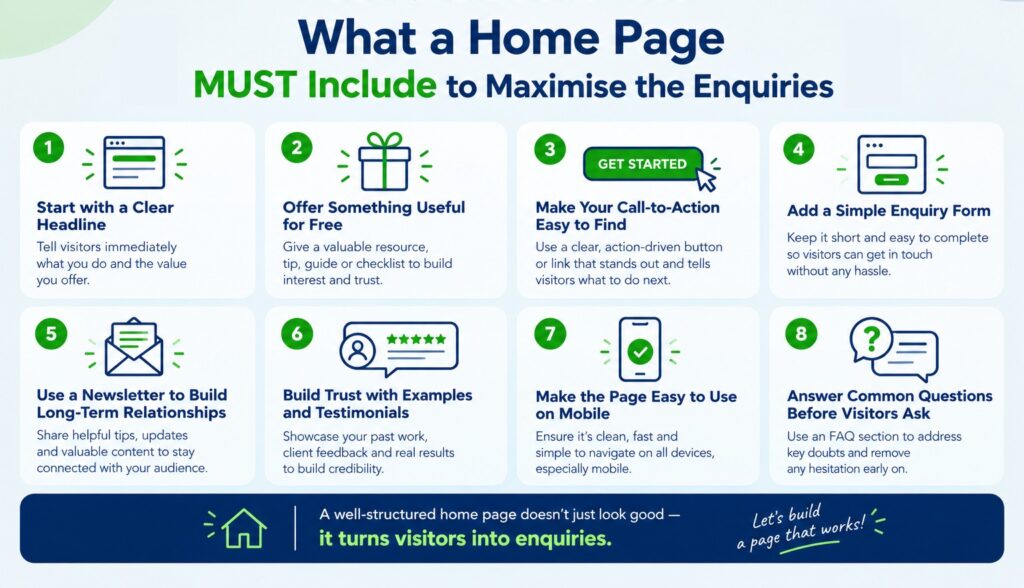
1. Start with a Clear Headline
When visitors arrive on your home page, they should quickly understand what you offer and how it can help them.
Avoid vague headlines such as “Welcome to Our Website” or “Your Trusted Business Partner.” Instead, explain your service or the benefit you provide.
For example:
- Instead of “Welcome to Our Website,” use “Professional Website Design for Growing Businesses.”
- Instead of “Our Services,” use “Find the Right Accounting Support for Your Business.”
Keep the headline short and relevant to the visitor’s needs. Add a supporting sentence that explains your service in a little more detail.
2. Offer Something Useful for Free
One way to encourage visitors to share their contact details is to offer something useful in return. This could be a free resource, a practical tip sheet, or a short consultation.
For example, a web development company could offer:
- A free website checklist for small businesses.
- A free initial website review.
- A downloadable guide to choosing the right website platform.
Ask visitors to enter their name and email address to receive the resource. Keep the form short and explain what they will receive.
The free offer should be genuinely helpful and related to your business. It gives potential customers a reason to contact you and helps establish your expertise.
3. Make Your Call-to-Action Easy to Find
A call-to-action is a button or link that tells visitors what to do next. It should be clearly visible and use simple, direct language.
Examples include:
- Request a Free Quote
- Book a Consultation
- Get Your Free Guide
- Subscribe to Our Newsletter
- Enquire About Our Services
Avoid filling the page with too many competing buttons. Choose one main action based on your business goal.
4. Add a Simple Enquiry Form
If your goal is to generate enquiries, make contacting you as easy as possible.
A form asking for a name, email address, phone number, and a brief description of the requirement may be sufficient for many service businesses. Only request information you genuinely need at this stage.
For example, a website design company could use the following form fields:
- Name
- Business email
- Type of website required
- Brief description of the project
A shorter form is often easier to complete. You can collect additional details when you follow up with the potential customer.
After submission, display a confirmation message so visitors know their enquiry has been received.
5. Use a Newsletter to Build Long-Term Relationships
Not every visitor is ready to purchase immediately. Some may be researching their options or planning a project for a later date.
A newsletter gives these visitors a reason to stay connected with your business.
Offer useful information such as industry updates, practical tips, short guides, or answers to common customer questions. For example, a digital agency could send a monthly email about website maintenance, online business improvements, and common website mistakes.
Place the newsletter subscription form in a suitable section of the home page. Ask only for essential details, such as an email address, and make it clear what subscribers can expect.
Always obtain consent before sending marketing emails and provide an easy way to unsubscribe.
6. Build Trust with Examples and Testimonials
Visitors are more likely to enquire when they feel confident about your business.
Include relevant customer testimonials, examples of completed projects, or short case studies that demonstrate your experience. If possible, explain the problem a client faced and how your service helped address it.
You can also display genuine business credentials, relevant certifications, or details about your team’s experience.
Avoid unsupported claims. Real examples and honest information are more convincing than statements such as “We are the best in the industry.”
7. Make the Page Easy to Use on Mobile
Many visitors browse websites on their mobile phones. If your home page is difficult to read or use on a small screen, potential customers may leave without enquiring.
Use readable text, clear headings, appropriately sized buttons, and enough space between form fields. Make sure images load efficiently and the page does not take too long to open.
Test the complete enquiry process on a mobile phone, including submitting forms and clicking contact links.
8. Answer Common Questions Before Visitors Ask
Potential customers often hesitate because they have unanswered questions about pricing, timelines, deliverables, or the process.
Include a short FAQ section that addresses the questions most relevant to your service.
For example, a website development home page could answer:
- How long does website development take?
- What information do you need from me?
- Can you update my existing website?
- Do you provide website maintenance?
Clear answers help visitors understand what to expect and can encourage them to take the next step.
9. Check What Is Working and Improve It
Once your home page is live, review its performance regularly. Look at how many visitors arrive, how many submit an enquiry form, and which traffic sources bring potential customers.
If many people visit but very few enquire, review your headline, offer, form length, and call-to-action. Make one change at a time and compare the results.
You can also ask customers how they found your business and what encouraged them to get in touch.
Final Thoughts
A successful home page does not need complicated design or lengthy content. It needs a clear message, a useful offer, easy contact options, and reasons for visitors to trust your business.
For SMEs, even small improvements—such as offering a free checklist, adding a newsletter subscription, or simplifying an enquiry form—can make the website more useful to potential customers.
At Activelink Web Design we help you create a home page that reflects your business, guides visitors towards the right action, and supports your enquiry-generation goals. The key is to design around what your customers need, rather than simply what looks attractive.